1. Add plugin
1.1. Create project
Run the following command to create a new project.
flutter create [project name]
1.2. Add files
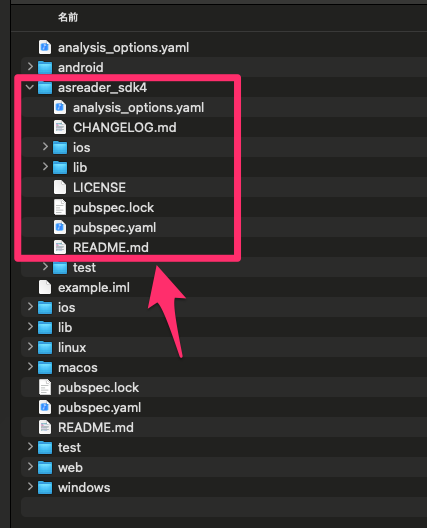
Add the asreader_sdk4 folder to your project.
1.3. Edit pubspec.yaml
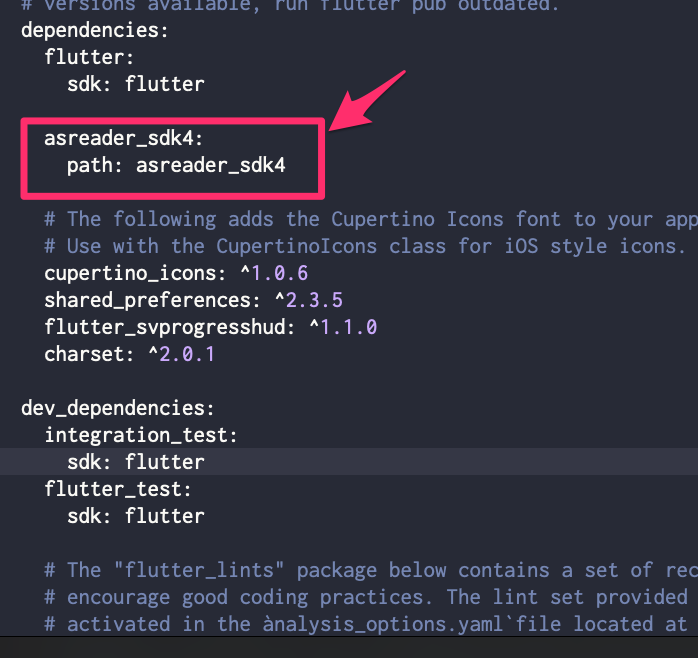
  asreader_sdk4:
    path: asreader_sdk4
Modify pubspec.yaml as shown.
1.4. Install the package
Run the following command to install the package.
flutter pub get
```{image} ../_static/media/pub_get.png :width: 500px :alt: flutter pub get ```
1.5. Update Cocoapods
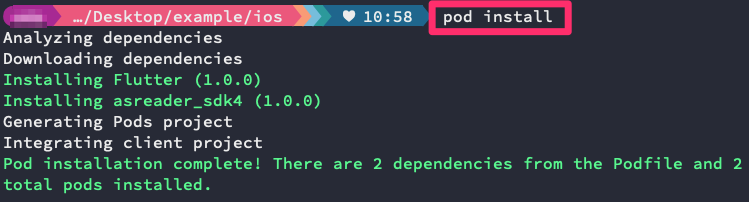
Run the following command to update Cocoapods.
pod install
1.6. Using plugins
You need to import the header file into the project that uses the plugin.
import 'package:asreader_sdk4/asreader_sdk4.dart';